

WonderPen
Let the Vast Ideas Bloom Like Flowers
WonderPen is a professional writing app that offers a focused and smooth writing experience for novels, papers, essays, diaries and more.
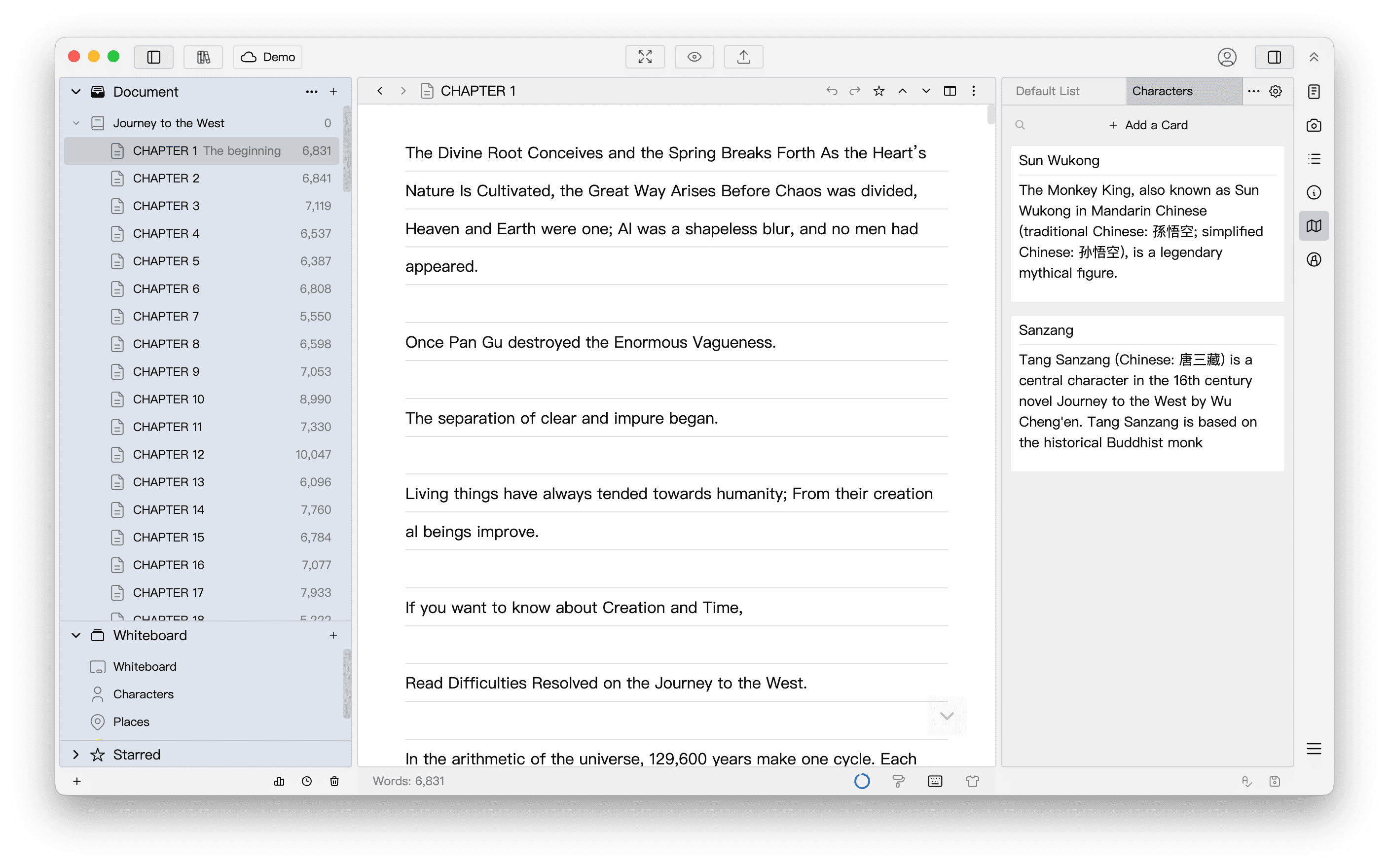
Built for long-form writing
From settings and structure to immersive writing and the final export, the right tool for every step.
Ideas and settings, always at hand
Characters, places, timelines... Keep everything you need to refer to on cards, whiteboards and mind maps, instead of switching between files.
- Mind maps for brainstorming and plotting
- Card lists for characters and settings
- Card titles highlighted in your text
Master long works with a tree
Organize documents in a tree with unlimited levels. Short or long, the structure always stays clear.
- Unlimited directory levels
- Split and merge chapters anytime
- Outline view of every chapter
Immerse yourself and keep writing
Compose, minimalist and typewriter modes keep distractions away, while writing targets and statistics show your daily progress.
- Compose, minimalist and typewriter modes
- Split editor for side-by-side reference
- Writing targets and statistics
Format, export, done
When you finish, tidy up the whole text with one-click formatting, then export it to images, PDF, Word, Epub, web pages and more. Multiple chapters can be exported together as one complete book.
- One-click formatting for a tidy text
- Export to images, PDF, Word, Epub, web pages and more
- Export multiple chapters as one book
More thoughtful features
From first idea to final draft, the right tool for every step.
Ideate
Ideas and references- WhiteboardLay out cards to plan your story
- Mind MapBrainstorm plots and timelines
- Card ListCharacters and settings at hand
- Highlight CardsCard titles highlighted in text
- MemoA memo for every document
- Editor SplitWrite with references side by side
Organize
Structure and layout- Tree DirectoryUnlimited levels for any work
- Outline ViewAll chapters in one table
- Split and MergeSplit or merge chapters anytime
- Auto NumberingChapters numbered automatically
- One-click FormattingTidy up the whole text in one click
- StatisticsWord counts by chapter and day
Write
Focus and comfort- Compose ModeNothing but your text on screen
- Typewriter ModeThe cursor stays in the middle
- Writing TargetsSet goals and track progress
- WYSIWYGFormatting shows as you type
- Auto ReplacePair quotes and expand shortcuts
- ThemesThemes, fonts and spacing
Deliver & Protect
Export and data safety- ExportImages, PDF, Word, Epub, HTML
- Offline FirstData stays local, write even offline
- Cloud SyncCloud libraries on every device
- Auto BackupFull backups every 15 minutes
- SnapshotsBring back earlier versions
- Interface LockLock the app while you're away
Find more in the user manual
Write on every device
Available on desktop and mobile.
Your data stays on your device so you can write offline, and cloud libraries sync across devices.
Loved by writers
Real reviews from signed authors, book reviewers and freelance writers
Choose your plan
Core features are free. Upgrade when you need more.
Basic
Provides basic writing functions, free to download and use, and the data is stored locally.
- Document creation and editing
- Whiteboard & cards
- Import txt files
- Export as Word, PDF, Epub, etc.
- Library backup and restore
- 1 cloud library
Pro
Unlock various advanced features, suitable for local writing scenarios or standalone mode.
- All Basic features
- Multiple theme colors
- Custom CSS
- More cards supported
- Cloud snapshots kept for 30 days
- 1 cloud library
Pro+
More cloud features and storage capacity, auto-sync, write anytime on multiple devices.
- All Pro features
- 1,000 cloud libraries
- 20,000 items per cloud library
- 100,000 characters per item
- Cloud snapshots kept for 90 days
- More space for attachments
Frequently Asked Questions
What is WonderPen?
WonderPen is a professional writing app for novels, papers, essays, diaries and more. It brings together the tools you need from first idea to final draft, so you can write with focus and flow.
Is WonderPen free?
The Basic plan is free to download and use. It includes document editing, whiteboards and cards, export to Word, PDF and Epub, library backup and restore, and 1 cloud library (up to 500 items).
Buy Pro for advanced features such as theme colors and custom CSS, or subscribe to Pro+ for more cloud libraries and storage.
Which devices are supported? Can I sync across devices?
WonderPen runs on Windows, macOS, Linux, iOS and Android. Get it from the downloads page. With a cloud library, your changes sync automatically, so you can start on your computer and pick up where you left off on your phone.
The mobile apps currently work with cloud libraries only. Basic and Pro each include 1 cloud library.
Where is my writing stored? Is it safe?
Local libraries stay on your computer and are never uploaded; cloud libraries sync to WonderPen's servers so you can write across devices. By default, WonderPen backs up the open library every 15 minutes and keeps document snapshots, so you can bring back earlier versions at any time.
We also recommend adding an extra backup location in Settings, such as another drive or a cloud drive folder, for an additional layer of protection.
What is the difference between Pro and Pro+?
Pro is a one-time purchase you can use forever. It unlocks all advanced features but includes only 1 cloud library with lower item and attachment limits, making it ideal if you mainly write in local libraries.
Pro+ is a monthly or yearly subscription that includes everything in Pro, plus 1,000 cloud libraries with much higher limits, making it ideal if you often write on different devices.
The main difference is in cloud libraries; see the full comparison for details. Local libraries are unlimited on every plan, including the free plan.
Download free and start writing
Core writing features are free. Upgrade to a membership when you need more.
It is better to have a wonderful pen than to have a wonderful thought, and it is better to sing together than to sing alone!